What is HTTP Caching?
Originally published on Medium on August 16, 2024.
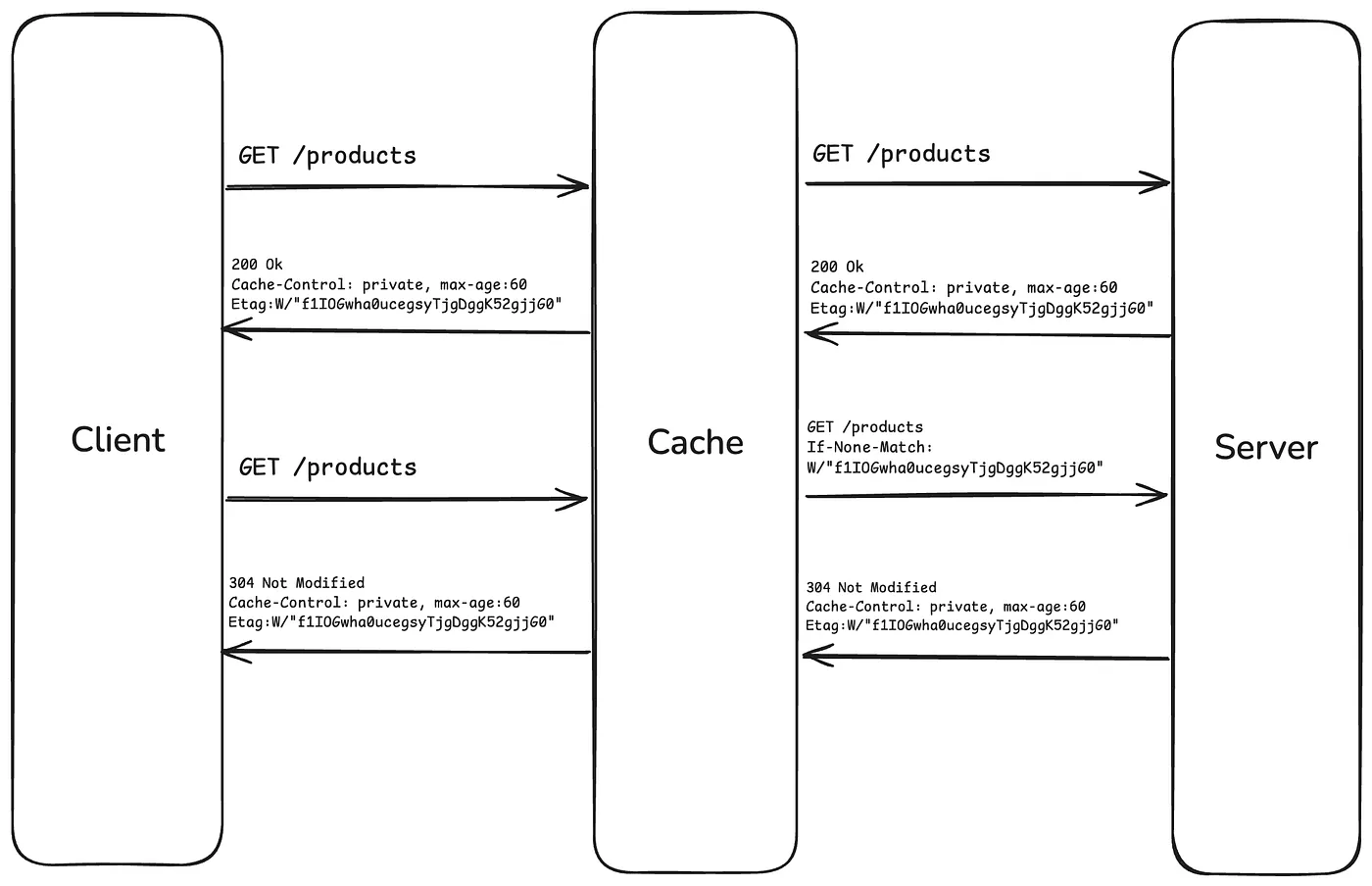
Suppose your API supports GET, POST, PUT, and DELETE requests. This guide focuses on caching GET responses, the most common use of HTTP caching.
Instead of downloading the same data for every request, a cache stores a response and reuses it when its caching rules allow. This can reduce network traffic, improve response times, and avoid unnecessary work on the server.
Cache types
There are two main types of HTTP cache:
- Private caches serve a single user. A browser cache is a common example.
- Shared caches can serve multiple users and sit between clients and the origin server. Examples include caching proxies, reverse proxies, and content delivery networks (CDNs).
Fresh and stale responses
A stored response can be fresh or stale. The server can specify its freshness lifetime through the Cache-Control response header:
Cache-Control: private, max-age=60private means the response may be stored in a private cache, but not in a shared cache. max-age=60 gives the response a freshness lifetime of 60 seconds, based on its age.
While the response is fresh, the browser can generally reuse it without contacting the server. After it becomes stale, the browser can ask the server whether the stored response is still valid rather than downloading its contents again.
This is where ETag and If-None-Match come into play.
Identify a response with ETag
An initial successful response might include these headers:
Cache-Control: private, max-age=60
Connection: keep-alive
Date: Thu, 15 Aug 2024 16:15:57 GMT
ETag: W/"141-deR1x3aPuJuzLJWzJcZ2gk3HNUo"
Keep-Alive: timeout=5
X-Powered-By: Express
An ETag is a validator assigned by the server to a representation of a resource. It is often generated from the content, but clients should treat it as an opaque value. The W/ prefix in this example indicates a weak validator.
The browser stores the response together with its validator so it can use that value during a later conditional request.
Set Cache-Control in NestJS
Use the @Header() decorator on a route handler to set its cache policy:
@Header('Cache-Control', 'private, max-age=60')This configures the response header. Generating validators and handling conditional requests depend on the underlying HTTP adapter or application implementation.
Revalidate with If-None-Match
When the browser needs to revalidate a stored response, it can send the previously received ETag in an If-None-Match request header:
If-None-Match: W/"141-deR1x3aPuJuzLJWzJcZ2gk3HNUo"The server compares this validator with the current representation:
- If the representation has changed, the server returns 200 OK, the updated response body, and its current
ETag. - If the validator still matches, the server returns 304 Not Modified, without sending the response body again. The browser reuses the cached body and updates its cached metadata from the response.
A stale response does not necessarily contain outdated data. Staleness means its freshness lifetime has expired. Revalidation can confirm that its contents are still current.
What about max-age=0?
In some circumstances, such as a reload, a browser may send a request directive like:
Cache-Control: max-age=0This asks caches for a response with an age no greater than zero, generally prompting validation. It is distinct from a response’s freshness policy and does not delete the cached data.
When a validator is available, the browser can still send a conditional request and reuse the stored body after a 304 Not Modified response.
Benefits
HTTP caching is particularly useful for resources that change infrequently. Reusing a fresh cached response can avoid a network request entirely. Revalidation still involves a request, but can avoid transferring the response body again.
The reduction in server work depends on the implementation: generating a validator may still require application logic or a database query. Caching and conditional responses serve related but different purposes.
With an appropriate policy, HTTP caching can reduce bandwidth usage, improve loading times, and free server resources for other operations.
For more information, see the MDN HTTP caching guide.